 Celebrate with up to 80% off
Are digital wallets safe? What to know before using one


Digital wallets are generally safe to use. Most reputable digital wallets include advanced security features designed to protect user data and transactions. Still, no payment method is completely risk-free, and understanding how digital wallets work can help you make smarter decisions and avoid common security threats.
What are digital wallets?
Digital wallets are apps or payment platforms that store your payment details, allowing you to make purchases on your mobile device (some also work on smartwatches and computers). Popular examples include Apple Pay, Google Wallet, Samsung Wallet, and PayPal, though features and payment methods vary by provider.
Beyond credit and debit cards, digital wallets can hold loyalty cards, gift cards, transit passes, event tickets, boarding passes, hotel reservations, coupons, and, in some places, digital driver's licenses or state IDs. Availability and acceptance vary, so a physical ID may still be required.
How digital wallets work
When you set up a digital wallet, you provide it with payment details, such as your debit or credit card information. The app verifies the card with your bank and links it to your wallet so you can use it for payments.
Paying with a digital wallet in real life involves holding your device near the payment terminal and confirming the payment on your phone when prompted. This works using a technology called Near Field Communication (NFC), which allows the device to communicate with the terminal over a very short distance. With major mobile wallets, the merchant typically receives a token or virtual account number rather than your actual card number.
Online and in apps, you simply select the digital wallet option at checkout if it's supported. Depending on the wallet and device, you may need to confirm the purchase using an authentication method.
Why people use digital wallets
Digital wallets offer convenience and faster checkouts. When shopping in person, you can access multiple cards from one device, avoid carrying every physical card, and complete contactless payments without handing your card to a clerk.
When shopping online or in apps, a digital wallet can save you from manually entering payment details, which may also reduce how often your card details are shared with merchants.
Many digital wallets also show recent transactions across linked cards, making it easier to track spending. However, your bank or card issuer remains the most accurate source for a complete transaction record.
Finally, some people use digital wallets because they can improve payment security compared with entering card details directly.
Also read: The ultimate guide to the safest online payment methods.
How digital wallets protect your payments
Digital wallets can have different security features depending on the app you use. However, most mainstream wallets offer the core protections described below.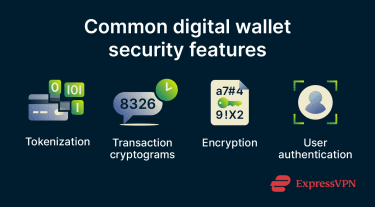
Tokenization and cryptograms
For many major mobile wallet card payments, the wallet doesn't share your actual card number with the merchant. Instead, it uses a payment token, such as a device account number or virtual account number, that stands in for your real card details.
The token is much less useful to attackers than a real card number because it's limited in where and how it can be used. Merchants generally can't use the token to see the actual card number, though authorized payment systems can map it back to an account to process the transaction. This means that if the merchant's system experiences a data breach, attackers are less likely to obtain the actual card number, though other personal or transaction data may still be exposed.
Alongside the token, the wallet may generate a one-time code, called a cryptogram or dynamic security code, for each transaction. This code helps prove that the payment is genuine and coming from an authorized device. Even if someone obtains the token, they generally can't use it to make a new payment without the right transaction-specific code.
Encryption
Digital wallets use encryption and other secure technologies to help protect payment data during storage, transmission, and authorization. In simple terms, sensitive data is protected so it can only be handled by authorized systems involved in the payment process, such as the wallet, payment network, or card issuer. Anyone who intercepts encrypted data without the right keys should only see unreadable information, not usable card details.
User authentication
For most payments, digital wallets require you to verify your identity before approving a transaction, though some express transit or low-friction payment modes may work differently. In practice, this usually involves a biometric check, such as fingerprint or facial recognition, or a PIN, pattern, password, or passcode. This extra step makes it harder for someone to use your device to make payments without your permission.
Read more: How user authentication works, why it matters, and best practices.
Potential concerns of digital wallets
Reputable digital wallets have strong security features, but they can still be exposed to various digital payment risks. These risks typically fall into a few key categories.
Online attacks
The wallet technology itself is not usually the easiest target. Attacks more often focus on the user's account, device, or online environment. Cybercriminals may use a variety of methods, including:
- Phishing attacks: Fraudulent messages that attempt to trick users into revealing sensitive information, such as login credentials for an account linked to a digital wallet.
- Credential stuffing: Automated attempts to access an account using login credentials leaked from previous data breaches.
- Malicious apps and websites: Fake digital wallet apps and deceptive websites designed to steal login credentials or install malware.
Device loss or theft
Since digital wallets are often accessed through a smartphone, device loss or theft can create a direct security risk. If the device, wallet app, or account isn't properly secured, someone with access to the device may be able to view sensitive information, such as transaction history, or attempt payments. Major wallets usually provide options to remotely lock the device, suspend wallet payments, or remove payment cards if the device is lost.
Unsafe usage environments
Logging into your wallet account, changing account settings, or making online purchases on public Wi‑Fi can be risky, especially on unsecured or fake networks. A rogue hotspot, sometimes called an "evil twin," is a fake network set up to mimic a legitimate one. If a user connects to one, an attacker may be able to monitor traffic, redirect users to phishing pages, or exploit weak security protections.
In public spaces, there's also the risk of shoulder surfing, where someone nearby attempts to observe your device passcode, wallet PIN, or other sensitive information while you enter it.
How to use digital wallets safely
Good cybersecurity for digital wallets depends not only on built-in protections but also on user behavior and device security practices.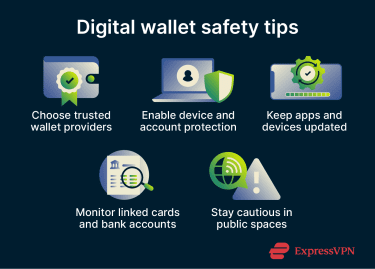
Use trusted wallet providers
A poorly designed wallet app may have weak security protections or poor privacy practices. There are also fake or malicious wallet apps designed specifically to steal login credentials or other sensitive data.
To reduce these risks, check the provider's reputation, security features, privacy policy, app permissions, and official app-store listing. Choose a well-known wallet with a strong security track record.
You should also download digital wallet apps only from official app stores or the provider's official website and check that the listed developer is legitimate.
Enable device and account security features
Set a strong screen lock on your device. Depending on your device, this may be a PIN, pattern, password, passcode, or biometric check. This makes it harder for someone to access a digital wallet, even if they have the phone.
You should also enable two-factor authentication (2FA) on any accounts linked to your digital wallet, such as your Apple ID or Google account. 2FA requires a second form of verification when signing in or making certain sensitive account changes, helping to prevent unauthorized access even if login credentials are compromised.
Enable built-in device protection features such as Find My on Apple devices or Google's Find My Device/Find Hub on Android, which can help you locate, lock, or remotely erase your phone if it's lost or stolen.
Keep apps and devices updated
Updating your phone's operating system and apps is an important part of mobile security. Software updates often include security patches that fix known vulnerabilities. For this reason, it's recommended to enable automatic updates or regularly install updates manually to stay protected.
Monitor linked cards and bank accounts
While digital wallet apps often include transaction history and activity alerts, you should still keep an eye on your bank and card statements for any unfamiliar or suspicious charges that may indicate fraudulent activity.
Exercise caution in public spaces
Avoid changing wallet settings, entering sensitive information, or making payments on public Wi-Fi unless the connection and app or website are secure. A reputable virtual private network (VPN) can help reduce local network snooping by encrypting your internet traffic. Some VPNs, including ExpressVPN with Threat Manager, can also help block known malicious sites, but they don't stop all phishing attempts or make unsafe links safe to open.
Additionally, be aware of your surroundings when using your phone in public. Avoid entering sensitive information where others may see your screen.
What to do if your wallet is lost or stolen
If a device you've linked to your digital wallet is lost or stolen, here's what you should do:
Remove wallet access from the device
Both Apple and Google provide remote device management tools that can help you lock, secure, or erase lost devices. On Apple devices, marking the device as lost also suspends payment cards and passes used with Apple Pay. If you believe the phone is unrecoverable, a remote erase can remove data and payment information from the device.
Separately, review the security settings for your Apple Account, Google Account, or wallet account on another device. Sign out of the lost device where appropriate, remove payment cards from the device if the wallet allows, and follow the provider's lost-device guidance.
Contact your bank, card issuer, or wallet provider
Report what happened to your bank, card issuer, or wallet provider. They can review recent transaction activity for signs of unauthorized use, help you freeze or replace linked cards, and guide you through any dispute process if fraudulent charges have already occurred.
Keep a record of the date, time, and name of the representative you speak with. This documentation helps if you need to follow up on disputed charges.
Freeze linked cards and accounts
Since major mobile wallets usually don't share your real card number during tokenized card payments, losing your phone doesn't automatically expose your linked card numbers. However, it can still create payment or account risk if the device or wallet account can be accessed.
For peace of mind, most banks allow you to freeze your card instantly through their mobile app or website, or by calling the number on the back of your card. You can request a replacement card if needed and add the new card details to your wallet once you have a new device.
Digital wallets vs. traditional payment methods
Both digital wallets and physical cards have protections in place, but they protect you in different ways and against different threats.
Are digital wallets safer than cards?
Digital wallets can be safer than physical cards in many situations, but the difference depends on the card type, payment method, and device security settings.
Traditional magstripe swipes rely on static card data that can be copied by skimming devices or exposed in merchant data breaches. By contrast, chip and contactless card transactions use Europay, Mastercard, and Visa (EMV) cryptography to generate a one-time transaction code, making them much harder to copy or reuse fraudulently.
Tapping a physical contactless card and paying with a digital wallet use similar EMV contactless technology, so both are significantly more secure than swiping a magstripe card. The difference is that major digital wallets often add tokenization, so the merchant receives a device-specific or virtual card number rather than the actual card number.
The main advantage of a digital wallet is layered authentication. As a result, someone who steals your phone usually has to bypass both the device's security and the wallet's payment protections. A stolen physical card may have fewer barriers to immediate use, especially for some contactless payments, although PIN prompts, contactless limits, and issuer fraud controls may still apply.
When cards may still be useful
Digital wallets are not universally accepted. Some merchants, particularly smaller businesses, those with older payment terminals, or those in regions with lower contactless adoption, may not support contactless or wallet payments. Cards remain essential as a backup for these situations. Cards also work without battery power. If your phone is dead, your wallet is inaccessible.
Choosing the safest payment option
The layered security of a digital wallet makes it a strong technical choice in environments that accept both wallet and card payments. However, the practical level of security depends heavily on personal habits: a digital wallet on a phone with no screen lock and an outdated operating system is not necessarily safer than a chip-and-PIN card used carefully.
FAQ
How do I know if a digital wallet provider is trustworthy?
Should I keep multiple cards in one digital wallet?
What should I check before making a wallet payment?
Do digital wallets hide my card number from merchants?
Do digital wallets work without internet access?
However, wallet setup, online purchases, transaction syncing, and some verification steps may require internet access.
Can digital wallet payments be reversed?
What signs could mean my wallet account needs attention?