Is Grammarly safe to use? What to know about data and privacy


Grammarly handles large volumes of user-written content, which can raise questions about privacy, data collection, and the processing of submitted text. While the platform includes security and privacy controls, it's useful to understand what information may be stored, analyzed, or used when working with sensitive documents or personal data.
What Grammarly is and how it works
Grammarly is a writing-assistant platform that offers suggestions on grammar, spelling, punctuation, tone, and style, with real-time feedback delivered as users type. Grammarly states that it's used by over 40 million people and 50,000 organizations worldwide.
In 2025, Grammarly changed its company name to Superhuman after expanding into a broader AI productivity suite that includes Grammarly, Coda, Superhuman Mail, and Superhuman Go. The Grammarly writing assistant continues to exist as a product under the Superhuman company name.
Grammarly's current pricing page lists Free, Pro, and Enterprise plans. Free includes core writing checks, tone, and a limited monthly AI prompt allowance. Pro adds features such as full-sentence rewrites, tone adjustments, plagiarism and AI-generated-text detection, and a larger AI prompt allowance. Enterprise adds organization-level controls that Grammarly lists as including Security Assertion Markup Language (SAML) single sign-on (SSO), application and domain controls, data loss prevention, audit logs, and other admin features.
The platform is available through Grammarly Docs/web editor, browser extensions, desktop apps for Windows and Mac, Microsoft Office/Word integrations (depending on platform and product version), and mobile apps/keyboards for iOS and Android.
Grammarly uses AI techniques, including machine learning (ML), natural language processing (NLP), and deep learning, to power its suggestions. For many Grammarly features, submitted text is processed through Grammarly's cloud-based services, which analyze the text and return suggestions. Cloud-based processing means the relevant content is transmitted to Grammarly's services, at least temporarily.
In a 2024 Grammarly blog post, Grammarly said its team was working on device-level AI processing on Google's Gemini Nano. However, that statement should not be read to mean Grammarly's current writing assistant generally processes submitted writing on-device.
What Grammarly can access when you use it
Since Grammarly processes text in real time, it needs access to relevant writing content to provide suggestions. Grammarly states in its Privacy and security FAQs that it doesn't record every keystroke on a device and that it makes clear when Grammarly is active. However, when a Grammarly product is active in a supported text field, app, website, or document, it may process the text needed to provide its service.
- Text in active text fields: When a Grammarly product is running, it can access text you write in the text field or document where it's active. With the browser extension, this can include supported text fields across websites where the extension is enabled.
- Additional context for AI features: Some features may use additional context to provide their service. For example, AI Chat in Grammarly for Mac uses context from the active window to tailor its response.
- Sensitive fields: According to Grammarly's Privacy and security FAQs, its products are blocked from running in read-only and sensitive fields, such as payment forms, password fields, and addresses, on a best-efforts basis.
Does Grammarly collect or store your data?
According to Grammarly's current Superhuman Privacy Policy, the information it collects depends on how its products are used and how privacy settings are configured. The policy describes several categories of information, including data users provide directly, data collected automatically through product or website use, and information about non-users that may appear in user content or contacts.
This data may be used to deliver and tailor its services, improve and develop products, train its AI models, secure the platform, process payments, communicate with users, market products, and handle compliance obligations. However, you can control whether your user content is used to train its AI models.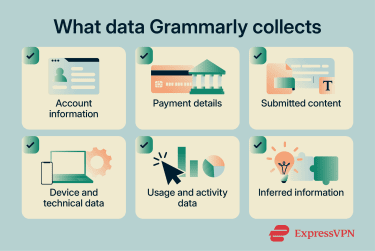
What Grammarly stores and collects
Although Grammarly may transmit and process content that users upload or that its products access, it doesn't necessarily store every piece of content in the same way or for the same purpose. However, it also collects and stores other user information in the course of delivering its services:
- Account information: When creating an account, Grammarly collects details such as your name, email address, password, job title, phone number, and preferences. It may also receive information about non-users; for example, when users exchange emails with people who don't use Grammarly, or give Grammarly access to their contacts. According to Grammarly's Privacy Policy, it uses non-user information only to provide its products and not to contact, advertise, or market to those individuals.
- Payment information: If subscribing to a paid plan, a third-party payment processor may handle the payment information. Grammarly collects information related to the transaction and may use information about past purchases for service, account, and marketing-related purposes.
- User content: Grammarly receives the content you upload or allows its products to access, including emails, drafts, text, documents, files, calendars, images, data, and other allowed content.
- Communications and feedback: Grammarly may retain the content of conversations with its support or sales teams, as well as information submitted through surveys or product feedback forms.
Grammarly's data collection practices may vary depending on region, account type, privacy settings, and local law. Its Privacy Policy includes additional privacy information for people in the U.S., the EU, the European Economic Area (EEA), the U.K., and Switzerland.
Does Grammarly collect metadata and diagnostic data?
Grammarly also collects metadata and diagnostic data about users, devices, and product usage, primarily to monitor performance, understand user behavior, and support marketing:
- Technical information: Grammarly automatically collects details about the devices and software used to access its products, including IP address, device type, browser type and version, operating system, installed apps, time zone setting and location, browser plugins, and platform. Depending on how its products are used, it may also collect technical information about third-party apps and tools where Grammarly is active.
- Usage data: Grammarly records how users interact with its products, including activity on its websites and apps, interactions with marketing communications, logs of which features are used, data from those features, read receipts, security logs, and quality and performance information about product operation.
- Cookies and similar technologies: Grammarly uses cookies, pixels, and local storage technologies to collect some technical and usage data and to recognize returning browsers and devices. These are also used to support advertising on third-party platforms.
- Inferred data: Grammarly may draw inferences about users based on the data it collects; for example, approximate location from an IP address, likely product interests from purchase history and usage patterns, and, depending on account settings, the industry a user works in or their individual writing style. However, Grammarly states that it uses safeguards and processes designed to protect personal information.
Does Grammarly share data with third parties?
The Superhuman Privacy Policy describes several scenarios in which user data may be disclosed to third parties.
Grammarly says it shares information within the Superhuman corporate family for business operations, product integration, development, improvement, and product promotion. It also uses trusted service providers to help operate its products and business, including companies that assist with payment processing, cloud infrastructure, and AI technology. These providers are bound by agreements that require them to comply with data privacy and security requirements and with Grammarly's instructions.
One specific case worth noting: when users interact with Grammarly's generative AI features, information used to power those features (prompt type, prompt text, and the context in which it is used) is shared with a small number of vetted service providers. Grammarly states in its Privacy and security FAQs that it doesn't allow these large language model (LLM) service providers to train their models on user content.
If a user enables third-party apps through Superhuman's online marketplace, data may also be shared with those third-party vendors or associated API providers in accordance with the user's settings. Grammarly may additionally disclose user information when required by law, legal process, or appropriate governmental request, or to help protect users, Superhuman, or others from fraud, abuse, illegal activity, or other potentially harmful activity.
Grammarly doesn't sell user content or use it to help third parties advertise to users. It does share user data with advertising platforms, but solely to promote its own products, not the content of what users write. Where possible, it uses de-identified data that cannot be linked back to individual users.
Data retention
According to the Superhuman Privacy Policy, Grammarly doesn't permanently retain all information it collects:
- Grammarly retains personal data for "as long as necessary" to provide its products, complete requested transactions, comply with legal obligations, resolve disputes, and support other legitimate business purposes. Retention periods vary depending on the type of data, how it's used, and how account settings are configured.
- Saved documents in the Grammarly Editor remain available until the user deletes them.
- Documents moved to the Grammarly Editor trash bin are permanently deleted after 30 days.
- For content processed outside the Editor, such as through extensions or apps, Grammarly's general retention policy applies: retention varies by data type, use, and account settings.
You can request a personal data report at any time to see what information Grammarly has collected about you. To request one, go to Grammarly's privacy settings and click Submit request next to Personal Data Report.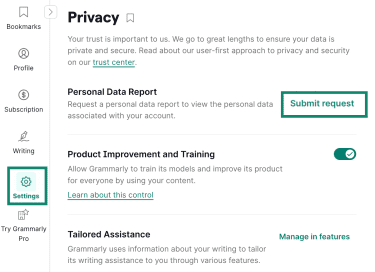
Grammarly will send an email when the report is ready, typically within a few hours. Access to the report expires after seven days.
How Grammarly protects your information
Grammarly points to internal security controls, user-controlled settings, and third-party certifications or attestations as part of its security and privacy posture.
Encryption and secure transmission
Grammarly states in its Privacy and security FAQs that it encrypts data in transit and at rest. Data in transit is protected using Transport Layer Security (TLS) 1.2, and data stored on its servers is encrypted using Advanced Encryption Standard (AES) 256-bit encryption.
According to Grammarly, all data is hosted in Amazon Web Services (AWS) data centers in the U.S. East region and uses native AWS backup tools to support product availability. Grammarly also lists Payment Card Industry Data Security Standard (PCI DSS) among its security and compliance validations.
According to Grammarly's security documentation, components that process user data operate in Grammarly's private network inside its secure cloud platform. Grammarly says each user's data is logically isolated from other users' data, and that its servers and network ports are behind load balancers and a web application firewall (WAF).
Access controls and internal safeguards
Grammarly states in its Privacy and security FAQs that it follows the least-privilege principle and regularly reviews employees' data access rights to ensure only the minimum required privileges are granted. Grammarly also says that all employee workstations run centrally controlled endpoint management software that enforces security configurations and protection solutions.
Individual users can enable two-step authentication (2FA) to add an extra layer of protection to their login. In Grammarly, go to Your account, or open Settings > Two-step verification, and follow the prompts depending on your sign-up method.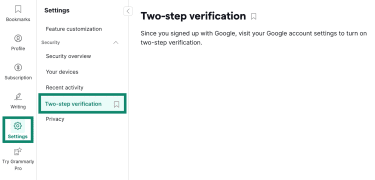
Note that 2FA is currently unavailable for Superhuman accounts.
For team plans, Grammarly provides roles and permissions for managing member access. Members of team plans can be assigned roles such as admin, account manager, or user, while Enterprise plans can also include group manager permissions and custom roles.
Enterprise plans also include SSO for centralized authentication, System for Cross-domain Identity Management (SCIM) for automated user provisioning, custom roles, application and domain controls, data loss prevention, session timeout controls, an Audit Logs API, and bring-your-own-key (BYOK) encryption for organizations that want to control and view access to data stored at rest in Grammarly's service.
Third-party attestations and certifications
In its security documentation, Grammarly states that it undergoes third-party network penetration testing, AWS security assessments, corporate infrastructure security assessments, and audits. It also runs an ongoing HackerOne bug bounty program to provide a channel for external security researchers to report potential vulnerabilities.
Grammarly lists the following third-party attestations, reports, certifications, and validations:
- System and Organization Controls 2 (SOC 2): An annual attestation, conducted by Ernst & Young, that validates controls for security, availability, confidentiality, and customer data privacy.
- System and Organization Controls 3 (SOC 3): A public report describing validated controls for security, privacy, availability, and confidentiality.
- International Organization for Standardization (ISO) / International Electrotechnical Commission (IEC) 27001: A privacy information management standard that extends ISO/IEC 27001 and ISO/IEC 27002.
- ISO 27017: A cloud-security standard covering Grammarly's provision and use of cloud services.
- ISO 27018: A standard covering the protection of personally identifiable information (PII) in the cloud.
- ISO/IEC 42001: An AI management-system standard focused on responsible AI development and use.
Grammarly has certified to the U.S. Department of Commerce (DOC) that it adheres to the EU-U.S. Data Privacy Framework (DPF), the U.K. Extension to the EU-U.S. DPF, and the Swiss-U.S. DPF for the collection, use, and retention of personal data from the EU, U.K., and Switzerland.
It also benchmarks against the National Institute of Standards and Technology (NIST) Cybersecurity, Privacy, and AI Risk Management Frameworks, which are widely adopted U.S. government guidelines for identifying and managing security, privacy, and AI-related risks.
Furthermore, Grammarly lists the Cloud Security Alliance (CSA) among its security and compliance validations. It also states that it's a corporate member of the Open Worldwide Application Security Project (OWASP) and is a member of the International Association of Privacy Professionals (IAPP).
Grammarly complies with the following laws and regulations:
- General Data Protection Regulation (GDPR): EU privacy regulation giving people rights over how their personal data is collected, used, stored, and transferred.
- California Consumer Privacy Act (CCPA): California privacy law granting consumers rights over certain personal information collected by businesses.
- Health Insurance Portability and Accountability Act (HIPAA): U.S. law establishing security and privacy requirements for sensitive healthcare information. Grammarly says protected health information should not be submitted unless a current Business Associate Agreement (BAA) is in place, and that it currently enters into BAAs only for Grammarly for Business Enterprise plans.
Privacy and security considerations when using Grammarly
Even though Grammarly implements multiple security safeguards to protect user data, any cloud-based service can still raise concerns.
Sensitive information and cloud-based processing
Despite encrypting data in transit and at rest, data exposure is still possible if an account is compromised, a device or browser is infected, a connected app is misconfigured, or a vulnerability affects the infrastructure or software used to process data.
Account security is also a factor. If an account is accessed by an unauthorized person, stored documents, account details, or other information associated with that account could be exposed. That's why it's important to activate Grammarly's account security controls, which can help reduce the risk of unauthorized access, including 2FA and a Security Hub for managing active sessions and linked devices.
Grammarly states that it uses security monitoring, access controls, and vulnerability-reporting processes, but those safeguards don't eliminate risks originating from devices, browsers, or connected apps. Attackers may target a browser, operating system, email client, or other app that interacts with Grammarly rather than Grammarly's infrastructure directly.
Is Grammarly a keylogger?
No. A keylogger records keystrokes, often without the user's knowledge. Grammarly doesn't fit that description for several reasons:
- Operates with user awareness: Grammarly states that it makes clear when Grammarly is active and that users can turn it off at any time. In some organizations, access may also be managed through administrator-controlled deployment and settings.
- Doesn't record every keystroke: Grammarly only processes text in active text fields where it's running, not system-wide keystrokes across all activity on the device.
- Avoids sensitive fields: Grammarly is blocked from running in read-only and sensitive fields, such as password, payment, and address fields, on a best-efforts basis.
- Provides user and admin controls: Grammarly can be turned off for specific websites, text fields, apps, or documents, depending on the product. Enterprise admins can also configure controls for supported apps and domains.
Has Grammarly ever had a security incident?
While there have been no major publicly reported data breaches exposing user data, Grammarly has had publicly documented security vulnerabilities.
In February 2018, a Common Vulnerability and Exposure (CVE)-2018-6654 was disclosed for Grammarly's Chrome browser extension. NVD rated the vulnerability 8.8 HIGH and classified it as an Origin Validation Error. The issue meant authentication token exposure was not restricted to a specific website, which could have allowed a malicious website to access a user's Grammarly account.
The flaw was discovered by Tavis Ormandy of Google Project Zero. Contemporary reporting said Grammarly deployed a fix promptly after being notified, with Ormandy describing the response time as "really impressive." In a company statement quoted by TechTarget, Grammarly said it had "no evidence that any user information was compromised." TechTarget also reported that, according to Grammarly, the vulnerability potentially affected text saved in the Grammarly Editor, but didn't affect Grammarly Keyboard, the Microsoft Office add-in, or text entered on websites while using the browser extension.
Is Grammarly safe for work, school, and personal use?
Grammarly's suitability and privacy settings vary depending on how and where it's used. Here's a summary of the key considerations for the most common use cases.
| School | Business | Personal | |
| Common use context | Grammarly is used by over 3,000 educational institutions worldwide | Grammarly is used by over 50,000 organizations worldwide | Grammarly is used by over 40 million people worldwide |
| Main privacy consideration | Institutional accounts may be managed by admins, who can control which AI features are enabled and who can access them | Enterprise plans include organization-level controls such as data loss prevention, BYOK encryption, application and domain controls, and audit logs | Individual accounts don't have organization-level admin controls, so privacy settings are managed at the account level |
| Key feature for this context | Grammarly Authorship can label text as written by the student, created with AI, or edited with Grammarly | SSO, SCIM, custom roles, and audit logs help organizations manage access and review account activity | Free includes core writing checks and limited AI prompts. Pro adds rewrites, plagiarism checks, AI-text detection, and higher AI prompt limits |
| Relevant plan or product | Grammarly for Education is designed for institutional use and education account management | Enterprise is designed for organizations that need advanced security, compliance, and admin controls | Free covers core writing checks; Pro adds advanced writing, plagiarism, and AI-detection features |
| AI training default | Off by default for all Grammarly for Education accounts | Off by default for Enterprise-tier accounts and Grammarly Pro or Business accounts purchased through Sales | On by default for individual Free, Premium, and single-user Pro accounts, with an opt-out control in account settings |
Grammarly privacy and account controls
Grammarly provides privacy and account controls that affect how information is collected, used, and secured. Some controls are managed by individual users, while others may be controlled by organization or school admins.
Adjust privacy settings
Grammarly offers a Product Improvement and Training control that affects whether user content can be used for product improvement and AI training. This setting is on by default for individual Free, Premium, and single-user Pro accounts, but off by default for Grammarly for Education accounts, Enterprise-tier accounts, and Grammarly Pro or Business accounts purchased through Sales.
Turns off Product Improvement and Training
For Free and Premium accounts:
- Go to account.grammarly.com/security/privacy.
- Click the Product Improvement and Training toggle.
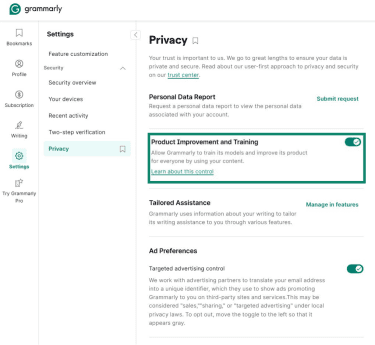
- When prompted, click Turn off.
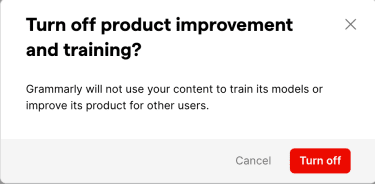
For single-user Pro accounts:
- Go to account.grammarly.com/admin/data_settings.
- Click the Product Improvement and Training toggle.
For team accounts, only account administrators can change the Product Improvement and Training setting for the entire team.
Opt out of tailored assistance
Tailored assistance analyzes writing history to personalize suggestions based on writing style and preferences. For individual accounts, users can manage these features from the Feature customization page:
- Go to account.grammarly.com/customize/features.
- Turn off any tailored assistance features that should not remain active. When a tailored assistance feature is turned off, stored data used to personalize that feature is deleted.
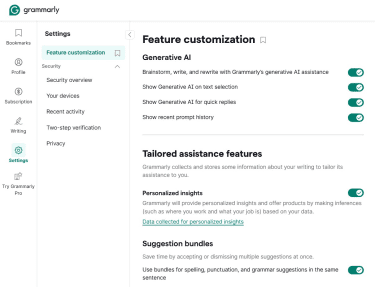
For Grammarly Pro team accounts, Grammarly admins can manage tailored assistance from the Feature access page at account.grammarly.com/admin/feature_access. Users who are not admins cannot change this setting for team accounts.
Opt out of advertising targeting
Where available, users can manage advertising preferences from Grammarly's privacy settings:
- Go to account.grammarly.com/security/privacy.
- Look for Ad Preferences or advertising-related privacy controls, and turn off the relevant targeted-advertising setting.
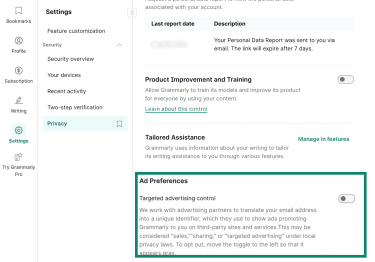
This type of setting affects targeted advertising preferences and doesn't necessarily stop all ads, product messages, or service-related communications.
Review app and browser permissions
Limit where the browser extension works (Chrome)
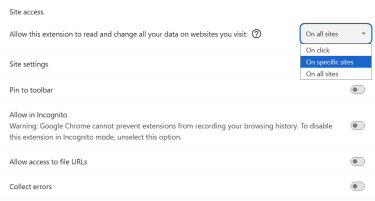
Chrome's extension settings can limit where an extension is allowed to read or change site data.
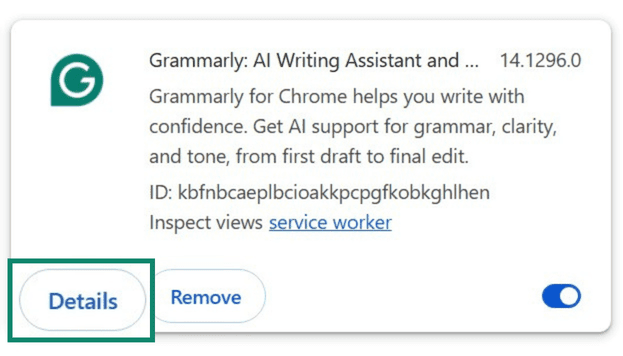
- Go to chrome://extensions/ in your browser.
- Find Grammarly and click Details.
- Scroll to Site access and open the dropdown. Select On click to grant site access only after clicking the extension, or On specific sites to limit access to approved websites.
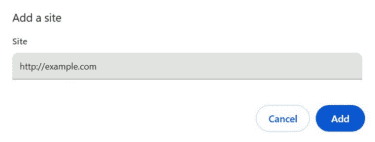
- If you chose On specific sites, add the website URLs where Chrome should allow Grammarly to run, then click Add.
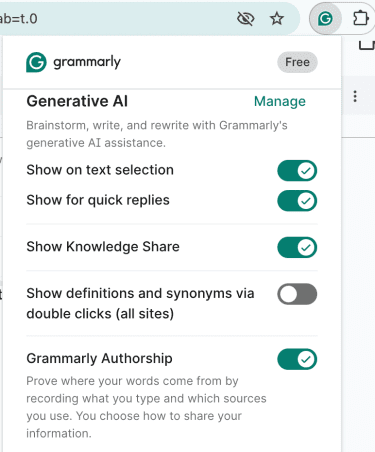
Manage Grammarly browser extension features
- Click the Grammarly icon in your browser toolbar.
- Switch Grammarly features on or off as needed.
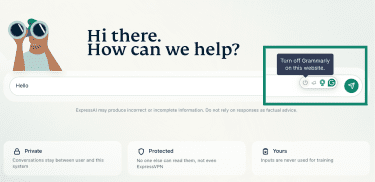
Turn off Grammarly on a specific website
- Look for the Grammarly widget on an open web page or app.
- Hover over the widget and click the power icon.
- Select Turn off Grammarly on this website.
Restrict Chrome extension permissions
- Go to chrome://extensions/ in your browser.
- Find the Grammarly extension and click Details.
- Review browser-level permissions, such as Allow in Incognito and Allow access to file URLs. If these settings are enabled, Chrome may allow the extension to run in incognito windows or on local file URLs.

If you use the Grammarly mobile keyboard, limit it to apps that need writing assistance and avoid enabling it in banking, healthcare, or other sensitive apps.
Also read: App permissions explained: What they are and why they matter.
Strengthen your account security
As with any online service, basic account hygiene reduces the risk of unauthorized access:
- Use a strong password: Create a strong, unique password. Change it if there's reason to believe it has been exposed or reused somewhere unsafe. Store passwords in a password manager.
- Set up 2FA: Grammarly provides 2FA from account security settings.
- Review active sessions and devices: Grammarly's Security Hub lets users manage active sessions and devices linked to their Grammarly account and sign out of devices they no longer use.
- Use official Grammarly products: Only install Grammarly products from the official website, official mobile app stores, or verified browser extension stores. Unofficial downloads or extensions claiming to work with Grammarly may not be covered by Grammarly's published security and privacy documentation.
How to delete your Grammarly data
There are two main ways to remove Grammarly data: either by deleting saved documents from the Grammarly Editor or by deleting the account entirely. Depending on the account type and region, additional privacy rights options may also apply.
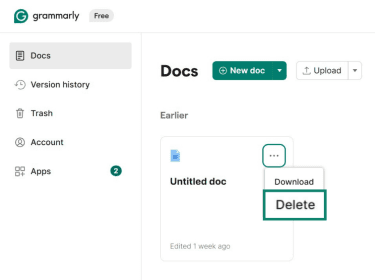
Delete documents from the Grammarly Editor
- Log into the Grammarly Editor.
- Find the document you want to remove, click the three-dot menu, and select Delete or the trash option.
- Open Trash from the left-hand menu. Select the document, click the three-dot menu, then choose Delete permanently.
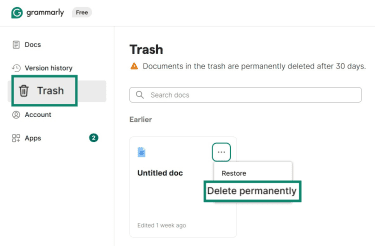
Documents in Trash can be restored within 30 days. After 30 days, it's permanently deleted.
Delete your Grammarly account
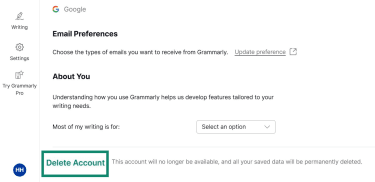
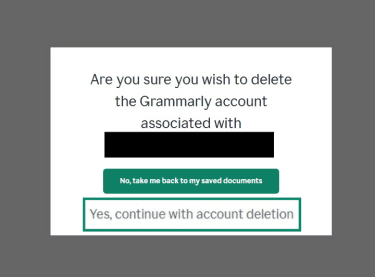
Deleting your account removes your personal information from Grammarly, including any documents saved in the Grammarly Editor, and cannot be undone.
- Go to account.grammarly.com/profile. Scroll to the bottom and click Delete Account.
- Enter your account password and click Yes, continue with account deletion to confirm.
If the account is part of an organizational subscription, the subscription admin must remove the account from the subscription first. For paid individual subscriptions, separate cancellation steps from the account's Subscription page.
FAQ
Is Grammarly safe to download?
Is Grammarly safe for confidential information?
For highly confidential content, the relevant consideration is whether a cloud-based writing tool aligns with the organization's privacy, compliance, and data-processing requirements.
Can Grammarly see everything I type?
Does Grammarly steal passwords?
Is Grammarly safe on iPhone and Android?
Can Grammarly read private emails or documents?
What happens to your text after it's deleted from Grammarly?