Is Rocket Money safe? An honest guide to security, privacy, and risks


Rocket Money is a popular app that offers budgeting and money management tools for U.S. users. It has strong safety measures in place, but there are security and privacy aspects to consider, such as what data the app collects and how the company may share data with third parties.
In this guide, we break down how Rocket Money works and how it protects your money and your data. We also discuss risks and drawbacks to consider and best practices to use the app securely.
What is Rocket Money, and how does it work?
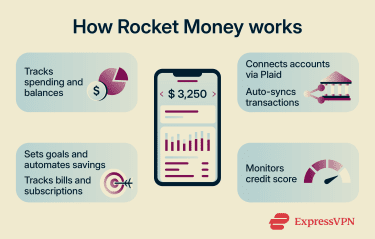
Rocket Money is a budgeting and money management app available to U.S. users that helps with tracking and managing spending. Let’s break down its essential features (some of which require the premium subscription):
- Complete financial dashboard: Rocket Money lets you set and track spending limits by category and check your available balance and net worth, income sources, and spending patterns in a unified interface.
- Banking integration: You can connect your banking accounts and cards. This can give you an overarching view of all your accounts, including automated transaction syncing and categorization.
- Financial goals and bill tracking: You can use the Financial Goals feature to enable automatic transfers of funds into a savings account and to keep track of your bills and subscriptions. The app also offers bill negotiation, a service that attempts to negotiate lower recurring bills on your behalf.
- Credit tracking: Rocket Money lets you monitor your credit score, with regular updates that help you monitor changes to your credit profile.
Is Rocket Money safe to use?
Rocket Money offers a safe and secure financial management experience. However, some users may be concerned about data privacy, especially concerning the sensitive financial data the budgeting app has access to. Here’s how Rocket Money handles key security and privacy aspects.
Encryption standards
Rocket Money encrypts all communication (like account credentials or budgeting data) with two security layers:
- Transport Layer Security (TLS): This protects data transmission between your device and Rocket Money’s servers. It protects against data tampering and unauthorized access by locking the communication using asymmetric cryptography.
- Advanced Encryption Standard (AES): Once the data reaches its servers, Rocket Money uses 256-bit AES encryption to secure it. This form of encryption uses a 256-bit key to encrypt data, and it’s considered to be one of the “gold standard” algorithms for securing sensitive data like banking information.
Plaid partnership and user data security
When you link your bank account to Rocket Money, the process happens through Plaid, a financial technology company that is used by thousands of financial institutions to connect apps and services to bank accounts. Here’s what the process generally looks like:
- Initiating the bank linking procedure on Rocket Money opens a Plaid authorization page.
- If your bank supports OAuth, Plaid redirects you to your bank’s login page, where you’ll enter your login credentials. This way, neither Plaid nor Rocket Money ever come into contact with your bank credentials. If your bank doesn’t support OAuth, you’ll need to enter your credentials directly into the Plaid Link page.
- With OAuth connections, Plaid receives a temporary authorization token from your bank, which it exchanges for an access token to your relevant banking data (like transactions). This access token is then shared with Rocket Money, which can then access your financial information for budgeting.
- With non-OAuth connections, Plaid securely collects your banking credentials to access your account data, but these credentials are not shared with Rocket Money (only the retrieved financial data is).
Read-only access and account control
Rocket Money is primarily used for aggregation and budgeting. By default, the app has read-only access to your banking data, which includes transactions made and your total balances. However, there are certain situations where Rocket Money can perform actions with your approval:
- Financial Goals: This savings feature lets you automatically move money from your linked checking account into a savings account at an Federal Deposit Insurance Corporation (FDIC)-insured partner bank. You can choose between Smart Savings, which adjusts transfer amounts every few days based on your checking account balance and savings ambition, or Custom Savings, which makes small, frequent transfers to help you reach a monthly savings target you set in the app. You can pause the feature at any time.
- Subscription cancellations: Rocket Money can identify subscriptions for you automatically, and if you choose to cancel them, the app can do that on your behalf. This only happens if you initiate the cancellation procedure from the Rocket Money app.
- Bill negotiation: Rocket Money can scan eligible bills and, with your approval, negotiate lower rates on your behalf for services such as cable, phone, and insurance. It charges a success-based fee only if it saves you money.
The Financial Goals feature is the most significant automation, as it directly handles payments made from your account. Rocket Money is able to send the money only to a predefined custodial account at a partner bank or financial institution. This account is known as a For Benefit Of (FBO) account, which means its legal owner remains the user and not Rocket Money.
Moreover, all custodial plans used by Rocket Money have FDIC insurance. This insures deposits of up to $250,000 per account against bank failure but not against events like cyberattacks, fraud, or unauthorized transactions.
Privacy policy and data sharing
Rocket Money’s privacy policy explains the type of data it collects, what it uses it for, and with whom it may share it.
What data does Rocket Money collect?
Rocket Money can collect your contact details (like your email address), account balances, bank account information, transaction history, and credit card information. It collects this information to give you access to the Rocket Money app and to provide you with specific budgeting services.
The company may also collect data from other parties, including credit agencies, your bank, or other third-party data aggregators.
Rocket Money says that it will retain your personal data for as long as reasonably necessary, until the end of the retention period, or until you request data deletion. However, there may still be some data that Rocket Money is required to keep for legal reasons.
How does Rocket Money share your personal data?
The company mentions several circumstances under which it may share your data:
- Business purposes, which can include processing your financial transactions, maintaining account functionality, reporting to credit bureaus, or responding to legal investigations.
- Marketing purposes, which refers to promoting Rocket Money-related products and services to users.
- Joint marketing with other financial companies that offer services or products of potential interest to you.
- Business and marketing purposes of Rocket Money’s affiliates (like other Rocket companies, including Rocket Mortgage and Rocket Loans), which can include data about your transactions, experiences, and creditworthiness.
You can’t limit the sharing of data intended for business, marketing, joint marketing, and affiliate business purposes. However, you can reject the sharing of data about your creditworthiness with affiliates and the sharing of data used for affiliate marketing.
User trust and overall legitimacy
Rocket Money itself is a legitimate service provided by Rocket Companies, a U.S.-based financial services company known for its mortgage business. It’s generally considered a secure financial app with a large user base that uses it for everyday budgeting and financial tracking.
It partners with FDIC‑insured banks for savings, uses security measures that comply with federal law, and undergoes regular audits, as well as running a bug bounty program that invites security researchers to identify any potential vulnerabilities before they become issues.
That said, it’s also worth noting that the Electronic Privacy Information Center (EPIC) filed a complaint against Rocket Money with the Consumer Financial Protection Bureau (CFPB) in 2022. It alleged that Rocket Money had engaged in “unfair, deceptive, and abusive trade practices and violations of the Fair Credit Reporting Act.”
It further claimed that the app’s interface was misleading customers and that some provisions in its privacy policies were contradictory. However, there has been no publicly reported enforcement action, settlement, or official resolution by the CFPB in response to that complaint.
Risks and drawbacks to consider
One of the main things to consider when using Rocket Money is the sensitive financial information you have to share with the app. This can include your bank balance, transactions, subscription amounts, or your credit score (if you use that feature). Other privacy considerations include:
- Third-party data sharing: Rocket Money relies on third-party service providers like Plaid to access your financial data. This approach means Rocket Money never sees your login credentials directly, but data does pass through multiple parties. That said, these providers are regulated and audited, helping to minimize the risk of mishandling or data breaches.
- Broad data usage: Rocket Money may use the financial data you share for purposes beyond the app’s core functionality.
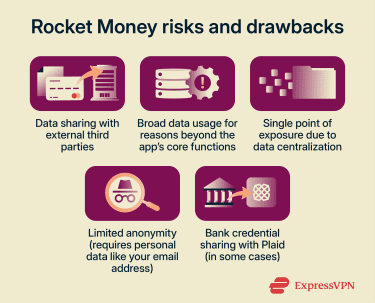
- Data centralization risk: Rocket Money centralizes your financial data, and the more banking accounts or credit cards you link, the more data ends up in the same place. While this is convenient, it can create a single point of exposure if access is compromised.
- Limited anonymity: As with most personal finance apps, Rocket Money isn’t designed for anonymous use. It requires personal data, such as transaction information and an email address, in order to work.
- Bank login sharing: When linking bank accounts to Rocket Money, you must log into your bank account through Plaid’s platform. If your bank doesn’t support OAuth, it means you’re sharing your bank login credentials with Plaid. Although the platform encrypts the credentials, some users may not feel comfortable sharing bank credentials with a third party.
When Rocket Money may not be the right fit
A key limitation is that Rocket Money makes bank linking mandatory. You can’t use the app without at least one bank account linked, which may be unsuitable for users who don’t want to share financial data with third-party services.
Similarly, users who want full control over how their financial data is interpreted may find Rocket Money’s system-driven automation too rigid. While you can edit categories and create budgets, the insights you receive are still based on the app’s underlying system and may not fully reflect how every user prefers to interpret their finances. Users who prefer a more hands-on approach may prefer other finance apps or manual budgeting.
How to use Rocket Money more safely
Follow these steps to stay safe when using Rocket Money:
- Link only the bank accounts you need: Connecting multiple accounts to Rocket Money can give you more complete insights, but you do not need to link everything. Limiting connections can reduce how much financial data you share and lower your exposure.
- Use a strong account password: Weak passwords are easier to crack through brute force or dictionary attacks. A password manager like ExpressKeys can help you generate strong passwords for your accounts, including Rocket Money, and store them securely.
- Enable multi-factor authentication (MFA): MFA adds a second layer of protection beyond your password. You can enable it for your Rocket Money account using options such as a text message code or an authenticator app.
- Review how Rocket Money uses your data: Reading Rocket Money’s privacy and data-sharing policy helps you understand what information the app collects, how it uses that data, and who it may share it with, while also showing you ways to limit sharing.
- Do not stop reviewing your bank statements: Rocket Money’s financial insights can be helpful, but your bank should still be your main source for checking suspicious transactions, fraud alerts, or other account issues.
- Understand how automatic features work: If you use Rocket Money’s Financial Goals feature, it can automatically move money from your checking account into a savings account. Only turn this on once you understand how it works and how to pause it if needed.
FAQ: Common questions about Rocket Money safety
Does Rocket Money have access to my bank login details?
Can Rocket Money move money out of my account?
Is Rocket Money safe for beginners?
What should I check before linking my bank account to Rocket Money?
What happens if I unlink my bank account from Rocket Money?
Can I delete my data from Rocket Money permanently?
Take the first step to protect yourself online. Try ExpressVPN risk-free.
Get ExpressVPN