
Is CurseForge safe? What modders should know before downloading mods


Using platforms like CurseForge to install mods to games like Minecraft is generally safe. However, because mods are created by third-party developers, they may include malicious code or be compromised after upload through updates.
CurseForge uses moderation and malware scanning to help detect harmful files, but in rare cases, malicious actors have distributed infected mods or compromised existing projects to spread malware.
What is CurseForge?
CurseForge is one of the most popular modding platforms for games like Minecraft, World of Warcraft, and The Sims. It allows creators to build and share mods with the gaming community.
The platform has over 500,000 mods, with over 100 billion downloads, and supports over 100 games. This includes games like Skyrim and Stardew Valley, as well as newer titles like Hogwarts Legacy and Baldur’s Gate 3.
Why gamers use CurseForge
Gamers use CurseForge to download and install mods for their games. Mods are unofficial modifications made by the community, and they can include anything from adding new items and retexturing objects to improving graphics and adding new non-playable characters (NPCs) to interact with.
Combining multiple mods can significantly change how a game looks and plays, depending on which mods you choose to install. The CurseForge app lets you easily manage mods and modpacks (multiple bundled mods packed into one installer).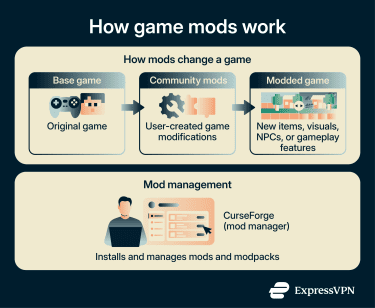
Is CurseForge safe?
CurseForge is a legitimate platform that’s generally safe to use for both mod creators and gamers. It scans mods for malware and has a content moderation system, but risks still exist because content comes from third-party creators, and no automated system can catch every threat.
Below, we’ll look at the key safety and privacy considerations around the CurseForge app and the website.
CurseForge app
The CurseForge app is safe to download from the official CurseForge website, and you can use it to install and manage mods more easily. It doesn’t contain malware, but the ads and data collection are worth discussing, especially if you’re not paying for the premium subscription.
Privacy and data collection
The CurseForge app may collect the following data from you:
- Diagnostic data: This can include system performance information when playing games, such as CPU and GPU usage, FPS, and ping, as well as crash reports. You can turn off this feature.
- Customization data: This can include the games you play, apps you use, and video capture preferences, and it’s used to make the app and website more personalized to you. You can turn off this feature, too.
Ad-related personalization data is another aspect to consider. When you first install CurseForge, you’ll get the option to customize ad data collection. You can do this after installation, as well.
Here’s what ad-related data may be collected and shared with CurseForge’s partners:
- Profile and activity data: Ads can be personalized based on data from your profile. Your activity may be used to build an ad profile, with data shared with CurseForge’s third-party partners.
- Ad interaction data: Ad and content performance can be measured, creating reports based on your activity with the ads (like clicking on ads or interacting with the content on the promoted websites).
- Device and identifier data: Cookies or device data (like network-based, login-based, or random identifiers) and other information (like browser type, screen size, and language) may be stored and read on your device to help recognize you when you connect to the website or app.
- Usage and context data: Advertising data presented to the user relies on data such as website or app usage, non-precise location, device type, and the content you have or are interacting with.
- Analytics data: Information about activity on the app, like interactions with the ads or content, can be used to improve the products and services of CurseForge and its partners.
Some data collected by the CurseForge app can’t be opted out of while using the service. This typically includes information required to ensure security, prevent fraud, fix errors, and support core functionality (such as IP address and device-related data).
Opting out of the ad-related data collection also won’t turn off ads; you’ll just receive generic ads. To disable ads, you’ll need to subscribe to CurseForge Premium.
CurseForge website
Previously owned by Twitch, CurseForge is now owned by Overwolf, a platform that lets content creators make mods, monetize their own games, or create gaming apps (like overlays). The CurseForge website falls under Overwolf’s privacy policy.
It collects non-personal data, which can include aggregate usage information and technical information like the type and version of your operating system, type of browser, internet service provider, device settings (like language settings), and mobile network information.
CurseForge’s website also collects some personal data:
- Online identifiers and usage data: IP address, cookie ID, visited pages, clicks, and access date/time. This is collected through first-party and third-party cookies for security, site/app operations, and fraud prevention. Non-essential cookies require user consent, which users can withdraw in cookie settings.
- Contact and profile information: Full name, email address, phone number, game interests, and preferences, when provided voluntarily. CurseForge uses this to provide customer support and may retain it for legitimate business or legal purposes.
- Approximate location: Location inferred from details like ZIP code or IP address. CurseForge may use this for contextual ads and language preferences, based on consent or legitimate interests, with retention depending on legal or operational needs.
CurseForge may share all types of personal data collected with the Overwolf Group, service providers, the authorities, and any entity that acquires the company. Users have the right to request the deletion of their personal data, but the company reserves the right to refuse such requests if necessary for legal, accounting, or service-related reasons.
What was the CurseForge malware incident?
In June 2023, an attacker targeted the Minecraft modding ecosystem, including platforms like CurseForge, and its users, including mod creators and gamers. According to CurseForge, the attacker used tailor-made malware (known as Fractureiser), which targeted .jar Minecraft mod files and was able to evade the platform’s antivirus detection. The malware impacted Windows and Linux users (Mac users were not affected).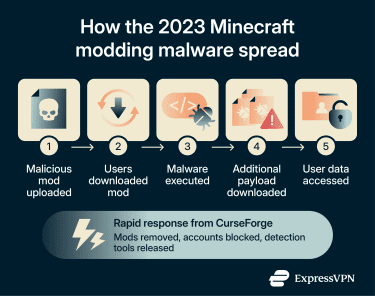
Once downloaded, it attempted to install additional malicious programs and access sensitive data such as login information and cookie files. To spread the malware, the attacker uploaded malicious .jar files and, in some cases, compromised existing mod projects and developer accounts. In total, over 8,700 non-unique downloads of infected content were recorded.
The attack was identified by community members, who flagged it to the CurseForge team and reported the attacker’s server to its hosting provider. Once the server was taken down, the malware could no longer deliver its payload.
Within hours, the CurseForge team and community had blocked the attacker’s account, removed malicious content, reverse-engineered the malware, and released detection tools. They also published a knowledge base to help users scan their systems, identify infections, and remove the malicious files.
Common risks associated with CurseForge
CurseForge is a reputable platform, but as with any modding platform, there are some risks to be aware of.
Malware and fake downloads
CurseForge scans and moderates all content uploaded to the platform, but it’s still important to remember that:
- Mods are made by third-party developers: CurseForge can review uploads, but it doesn’t write the mod code itself. This means the quality and security of mods can vary from creator to creator.
- Attackers may upload malicious files: Some files may be disguised as legitimate mods.
- Trusted mods can still be compromised: In incidents like Fractureiser, attackers compromised mod authors’ accounts and used them to update trusted mods with malicious code.
These incidents aren’t typical, but they show how mod distribution can be abused if users don’t verify what they download. Outside the legitimate platform, attackers may also create fake CurseForge sites, reuploading mods with hidden malware or bundling them with malicious files instead of standard mod formats.
Third-party ads and redirects
CurseForge’s app uses ads to support the free tier. Aside from the privacy implications, this can introduce indirect risks. While ads themselves may not be malicious, they lead to external sites that are outside of CurseForge’s control.
In some cases, such ads may redirect users to malicious websites that mimic legitimate mod pages or trigger downloads of unwanted software (malvertising). What makes this riskier is redirect chains. Clicking an ad may send a user through multiple sites before landing on the final page. Any point in the chain may contain malicious scripts or misleading downloads that could potentially affect the user’s browser, depending on vulnerabilities or user interaction.
These risks aren’t unique to CurseForge or modding platforms; they apply to ad-supported platforms in general. CurseForge has stated that it uses controlled and curated ad placements rather than intrusive formats like pop-ups, and most users aren’t likely to encounter malicious ads during regular use.
Outdated or poorly maintained mods
Not all mods on platforms like CurseForge are being actively maintained or patched on time, and some may introduce security risks. If mods stop receiving updates, they may break new game updates, conflict with newer mods, or contain vulnerabilities and bugs.
Aside from potential compatibility and stability issues with games (including corrupted saves or crashes), the outdated code in poorly maintained mods can have known vulnerabilities. The BleedingPipe vulnerability first spotted in Minecraft mods in 2022 is one such example.
The exploit affected certain Minecraft mods that used unsafe deserialization code, particularly older Forge-era versions. The issue could allow remote code execution on vulnerable clients or servers. According to a GitHub report at the time, the vulnerability was actively researched and patched within the community, and while exploitation was possible, confirmed successful attacks were limited.
Over 40 mods were vulnerable to the exploit at the time, with some having all or multiple versions suffering from the same vulnerability.
The most dangerous aspect of the attack was that it was hard to detect. It affected legitimate mods through no particular fault on the part of the mod creators. Vulnerable older versions were no longer maintained, but this isn’t unexpected in the modding community, and nor is it against the community guidelines on modding platforms.
Best practices for safe modding
Modding safely doesn’t require advanced skills, but it does require paying attention to what you download.
How to evaluate mods before downloading and installing them
Here's what to look for before downloading and installing mods from CurseForge:
- Patch notes: Check the mod’s patch notes to see if they’re recent. If the mod is actively maintained, it will have recent patches, which can help reduce the risk of exploits and code vulnerabilities. That said, update frequency can vary significantly depending on the size and purpose of the mod, and some well-maintained mods may not update for months if no changes are needed. Nonetheless, while a mod that hasn’t been updated in years isn’t necessarily vulnerable, it’s something to be aware of.
- Mod creator reputation: Always prioritize verified and trusted mod sources and creators who have a good reputation on the platform. Look for user reviews and ratings before you download the mod. When it comes to modding, community feedback is a strong (but not absolute) indicator of legitimacy.
- Mod file type: Avoid mods that require extra launchers or helper tools unless you understand the context and are confident in the mod creator. Additional software isn’t inherently unsafe, but unexpected or unofficial launchers can introduce additional risk if they’re not widely trusted or properly sourced.
Note that mod file types are generally consistent within each game’s modding ecosystem or framework. For instance, Minecraft mods are typically .jar files. However, some legitimate modding tools or modpacks may use installers or separate launchers, so the key risk factor is whether the software comes from a trusted and official source.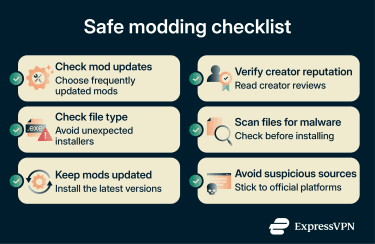
Ensuring security while modding
All individual mods have two installation methods:
- Manual: Download the mod files from CurseForge, extract the archive (if there is one), and copy the files into the game’s “mods” folder or the relevant modding folder required for the game you’re modding.
- Mod manager: Download the mod files, open the mod manager (already configured to the game you’re modding), upload the mod archive, and enable the mod. Many mod managers also handle dependencies and installation automatically, depending on the tool.
Modpacks tend to be different. They’re typically installed through a mod launcher (like the CurseForge app or Prism Launcher) that automatically downloads all the necessary mods and copies them to your game folder.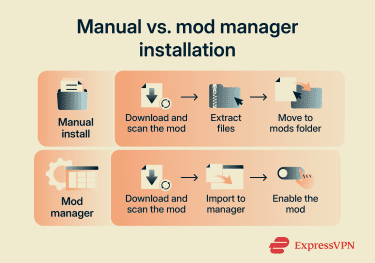
Checking files for malware can improve security during the modding process. Antivirus tools typically have automatic scanning tools for browser downloads, but if yours doesn’t, you can manually scan the mod before installing it.
It’s also best to keep your mod manager and your mods up to date. Many mod managers have automatic updates (for the mod manager app) enabled by default. If yours doesn’t, you’ll likely receive notifications about available updates.
As for mods, the mod manager should alert you when there’s a new update available (though this depends on the specific mod manager, and not all tools provide automatic update notifications). If you don’t use a mod manager, you may need to check individual mod pages for updates and download newer versions yourself, then repeat the installation process.
What to do if a mod behaves suspiciously
If a mod looks suspicious, don’t download it. And if your device starts behaving strangely after installing a mod (like unexpected system or browser changes), run an antivirus scan. Delete the mod and check the creator’s page for similar user experiences in the community.
Until you’re confident your system is clean, avoid logging into online accounts, as some malware may attempt to steal credentials or session data. It’s also a good idea to look for any leftover changes the mod may have introduced, such as browser redirects, unfamiliar programs, unknown processes, or unexpected system configuration changes.
FAQ
Can antivirus software detect harmful mods?
Should I avoid mods with very few downloads?
How can I tell if a mod page looks suspicious?
Is it safer to use the CurseForge app than manual downloads?
Can old mods create security or performance issues?
What should I check before updating a modpack?
Do mod conflicts make a mod unsafe?
Can private or unlisted mods be trusted?
Are mods legal to use?