Privacy vs. anonymity: What ExpressVPN protects and what it doesn't


ExpressVPN improves your privacy by encrypting the traffic it carries and hiding your public IP address from websites, but it doesn’t make you anonymous.
Does ExpressVPN make you anonymous?
ExpressVPN, like any VPN, doesn’t make you anonymous. Hiding your IP address removes one way to identify you, but websites and apps have others:
- Accounts: Signing in tells a service who you are, whatever IP address you use.
- Cookies: Saved cookies can link your visits together, even after you switch VPN locations.
- Browser fingerprinting: Sites can recognize your browser and device from their settings and characteristics.
- Details you share: Your name or email address can identify you, wherever you post them.
What ExpressVPN changes about your connection
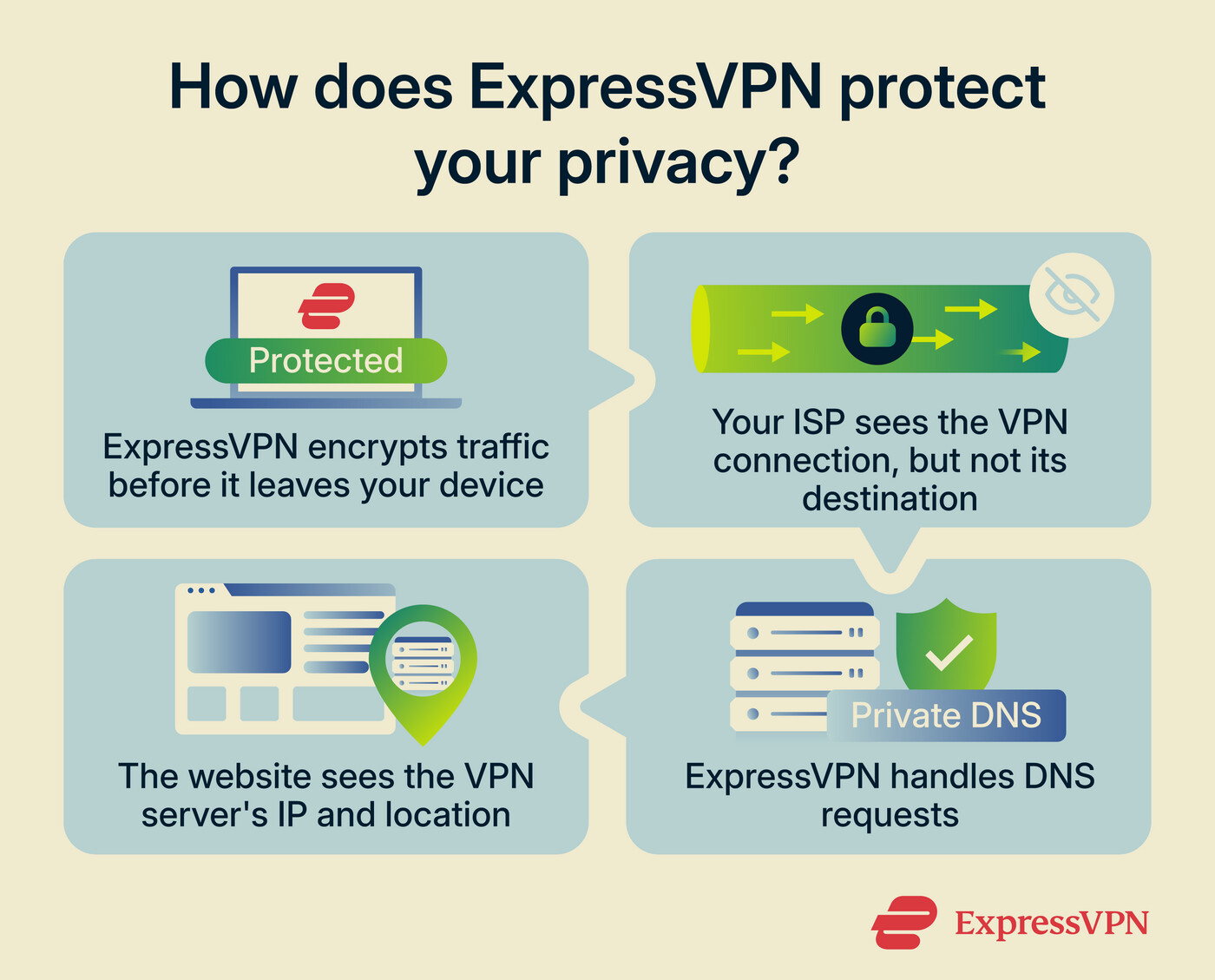
When you connect to ExpressVPN, your internet service provider (ISP) or Wi-Fi network can see that you’re using a VPN, when you connected, and how much data you use. However, it can’t read your traffic or normally see which sites it goes to because ExpressVPN encrypts it before it leaves your device.
Websites see the ExpressVPN server’s IP address instead of your usual public IP address. This prevents them from using that IP address to identify your ISP or estimate your IP-based location.
ExpressVPN also normally sends Domain Name System (DNS) lookups through its own private DNS servers rather than your ISP’s. DNS translates a website's domain name into the numerical address needed to connect to it, so your ISP doesn’t get a list of all the sites you look up. The exception is when your browser’s secure DNS setting sends lookups to another provider, which the DNS leak test described below can show.
How ExpressVPN reduces tracking and exposure
ExpressVPN includes features that go beyond hiding your IP address.
Block trackers and malicious sites
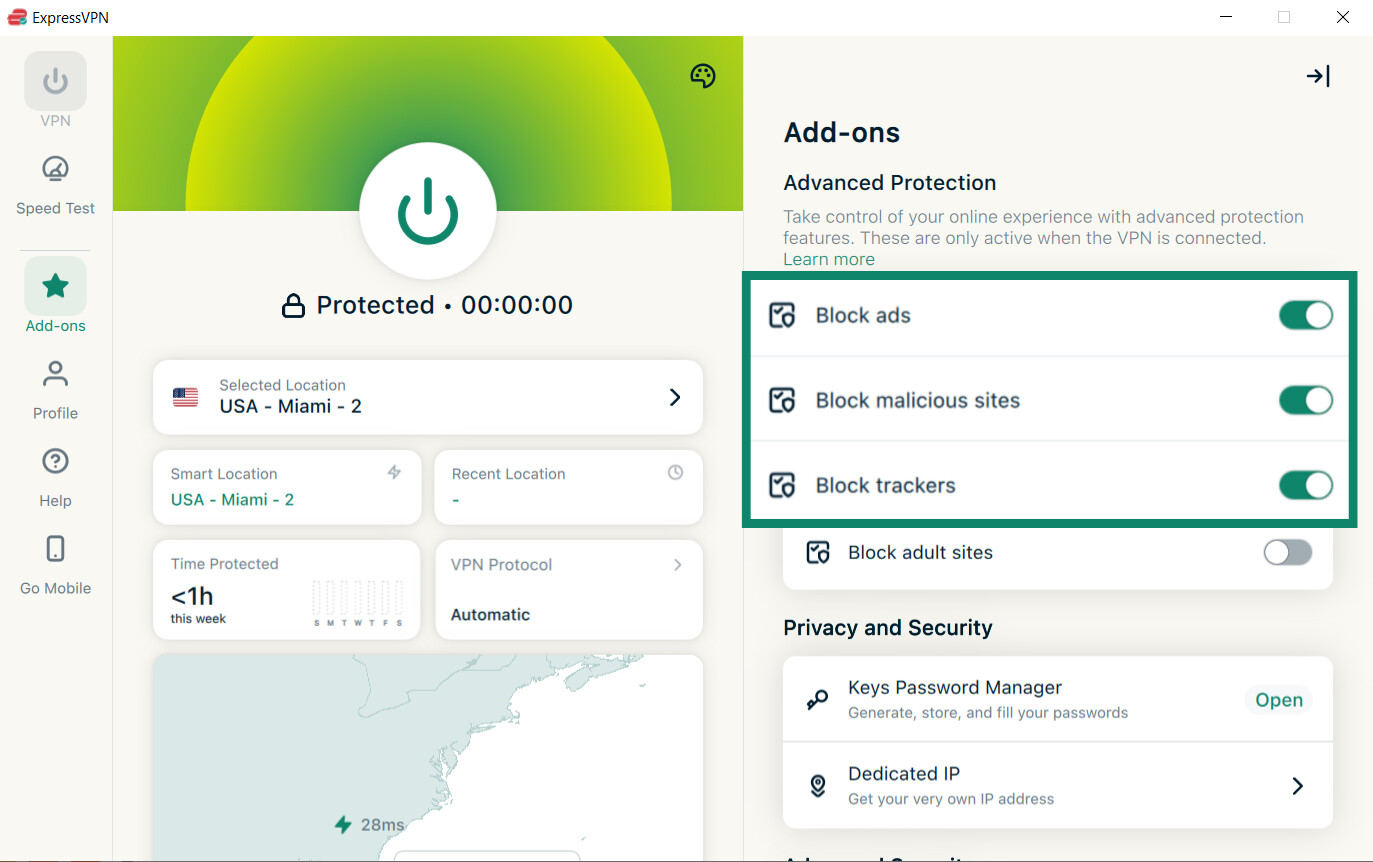
When enabled, ExpressVPN’s Block trackers feature stops connections to known tracking domains while you’re connected to the VPN. This reduces the data that advertising and analytics companies can collect about your browsing activity.
Some online privacy risks come from what your device connects to, rather than the connection itself. Two other Advanced Protection features help address these risks:
- Ad blocker: Stops connections to known advertising domains, reducing ads and some associated tracking requests.
- Block malicious sites: Prevents your device from connecting to known phishing, malware, and fraudulent domains.
Note that these settings only work while you’re connected to the VPN.
You can turn on Advanced Protection from the ExpressVPN app. Go to Add-ons > Advanced Protection and toggle on the features you’d like to enable.
If you don’t keep the VPN on whenever you browse (which is advisable), you may find Web Protection more convenient to use for blocking phishing and similar sites: this feature works in the ExpressVPN browser extension regardless of whether the VPN is turned on. It also gives you more granular protection, since it blocks specific URLs, not entire domains.
Keep your email address private with ExpressMailGuard
An email address can identify you to a service even when your IP address is hidden, and it can link your accounts across different sites. ExpressMailGuard lets you sign up with an alias instead of your real address. Messages sent to the alias are forwarded to your inbox, and the service only ever sees the alias.
Using a different alias for each sign-up stops services from matching your accounts by email address. If an alias starts receiving spam or turns up in a data breach, you can disable it without changing your real address.
To create an email alias, sign into ExpressMailGuard, select Aliases, choose the type of alias you want to create, and follow the prompts. You can then give the alias to a website instead of your primary email address.
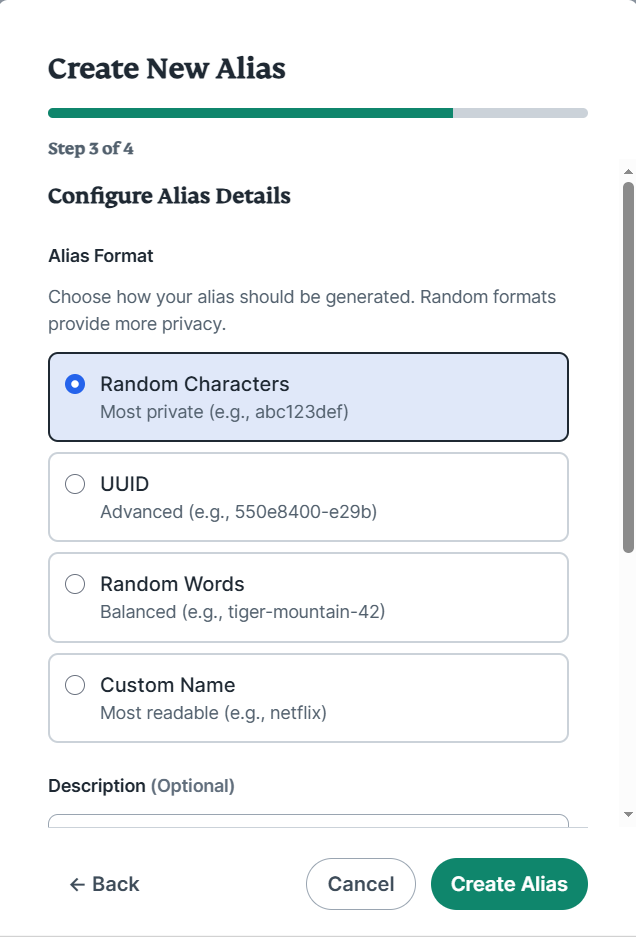
See the ExpressMailGuard guide for full instructions. ExpressMailGuard is included in all ExpressVPN subscription plans.
How ExpressVPN handles your browsing data
ExpressVPN doesn’t collect or store your browsing history, traffic destinations, data contents, or DNS queries while you’re connected. It also doesn’t keep connection logs, which means there’s no record of your source IP address, the VPN IP address you were assigned, when you connected, or how long a session lasted.
Because those records don’t exist, ExpressVPN can’t tell:
- Which customer visited a particular website or used a particular service.
- Which customer was connected at a specific time, or which VPN server IP address they used.
- Which source IP addresses a customer’s devices connect from.
If anyone tries to make ExpressVPN hand over this type of information, it can’t, because there’s nothing to hand over.
What information ExpressVPN does collect, and why
ExpressVPN collects a small amount of information to provide and manage its services. None of it shows what you do online:
- Account details: Your email address and payment information. Depending on how you pay, this can also include your name and billing address. ExpressVPN uses this to manage your subscription, process payments, prevent fraud, and contact you about your account. These details identify your account, but ExpressVPN doesn’t keep browsing logs that link your account to specific websites or online activities. Where available, payment options such as gift cards and Bitcoin let you share less personal information when you subscribe.
- App information: Which ExpressVPN apps and app versions you’ve activated. This helps our Support team troubleshoot any technical issues, such as whether an app needs updating.
- Connection summaries: Whether you connected on a given day, which VPN location you used, and the country and ISP you connected from. This doesn’t include the time you connected, your source IP address, or the VPN IP address you were assigned. ExpressVPN uses it to diagnose connection problems, give country-specific advice, and fix network issues.
- Data usage: The total amount of data transferred through the VPN, rather than a breakdown of the websites visited or the content accessed. It lets ExpressVPN spot when one user is pushing more traffic than thousands of others combined, which can slow the service for everyone.
Can ExpressVPN identify you from its connection summaries?
In practice, ExpressVPN might know that a customer connected to its New York VPN location on a particular day and transferred a few hundred megabytes over a 24-hour period. It wouldn’t know which sites they visited, what they did, or what time they connected. Thousands of other customers also connect to the New York location on any given day, so that summary can’t single out one person as responsible for any specific online activity.
ExpressVPN can hold account details and limited usage summaries without having a record of an individual’s browsing activity. Knowing that an account used the VPN is not the same as knowing what that customer did online.
The ExpressVPN apps can also send crash reports, connection diagnostics, and speed test data, but only if you opt in. This data is anonymized: ExpressVPN doesn’t store which user sent it or their IP address, so it can’t be tied back to an individual. You can turn sharing on or off at any time in the app’s settings.
ExpressVPN's privacy controls have also been independently assessed by KPMG. The 2025 audit examined ExpressVPN's privacy policy and TrustedServer technology and assessed whether its VPN servers operated in accordance with the stated privacy protections.
For the full details, see the ExpressVPN privacy policy and the 2025 KPMG audit report.
Check what websites can see when you use ExpressVPN
A few quick checks show whether ExpressVPN is hiding the connection details you expect it to hide. These checks test specific aspects of your VPN connection:
- Public IP address: Your public IP address should change when you connect to a VPN. ExpressVPN’s IP address checker lets you compare your IP address before and after connecting to ensure websites see the VPN server’s address rather than yours.
- DNS leaks: ExpressVPN's DNS leak test shows which DNS providers are handling your requests while you are connected.
- Web Real-Time Communication (WebRTC) leaks: The WebRTC leak test checks whether your browser exposes your usual public IP address through WebRTC, a browser technology used for video calls and other real-time features.
You don't need to be anonymous to have more privacy
ExpressVPN helps keep your browsing activity private from your ISP, masks your public IP address, and offers tools to block known trackers and hide your real email address when signing up for services.
Reduce your digital exposure with ExpressVPN
Try ExpressVPN with a 30-day money-back guarantee for new users.